Take Control of Your WordPress Admin Experience with WordPress Customization Plugin: The Ultimate Tool from Expand for 2025
Running a WordPress site in 2025 means juggling multiple users, complex workflows, and a growing demand for efficiency. Whether you’re managing a team of editors, developers, or clients, the default WordPress admin dashboard can feel like a one-size-fits-none solution. Enter the WordPress Customization Plugin, the game-changing tool that puts you in the driver’s seat. Designed by Expand for businesses, agencies, and site owners who crave control and style, this plugin lets you restrict access to admin menus by user roles or individual users while adding a splash of personality with customizable dashboard colors. It’s the perfect blend of security, functionality, and flair—built for the modern WordPress user.
Why Admin Customization Matters Now More Than Ever
WordPress powers over 40% of the web, and with that dominance comes complexity. The default admin interface is powerful but chaotic—every user, from admins to contributors, sees the same sprawling menu of options. For site owners, this can spell trouble: accidental changes by inexperienced users, cluttered dashboards slowing down workflows, or even security risks from overexposed settings. Digital marketing teams need streamlined access to SEO tools, developers want coding options locked down, and clients shouldn’t touch anything they don’t need to. Meanwhile, a bland dashboard does little to inspire productivity or reflect your brand.
That’s where the WordPress Customization Plugin steps in. Launched in 2025 by Expand, a leader in digital marketing and software development, this plugin redefines how you manage your WordPress backend. It’s not just another tool—it’s a solution crafted to meet the evolving needs of site admins who demand precision and personality.
Restrict Access with Precision: User Roles & Beyond
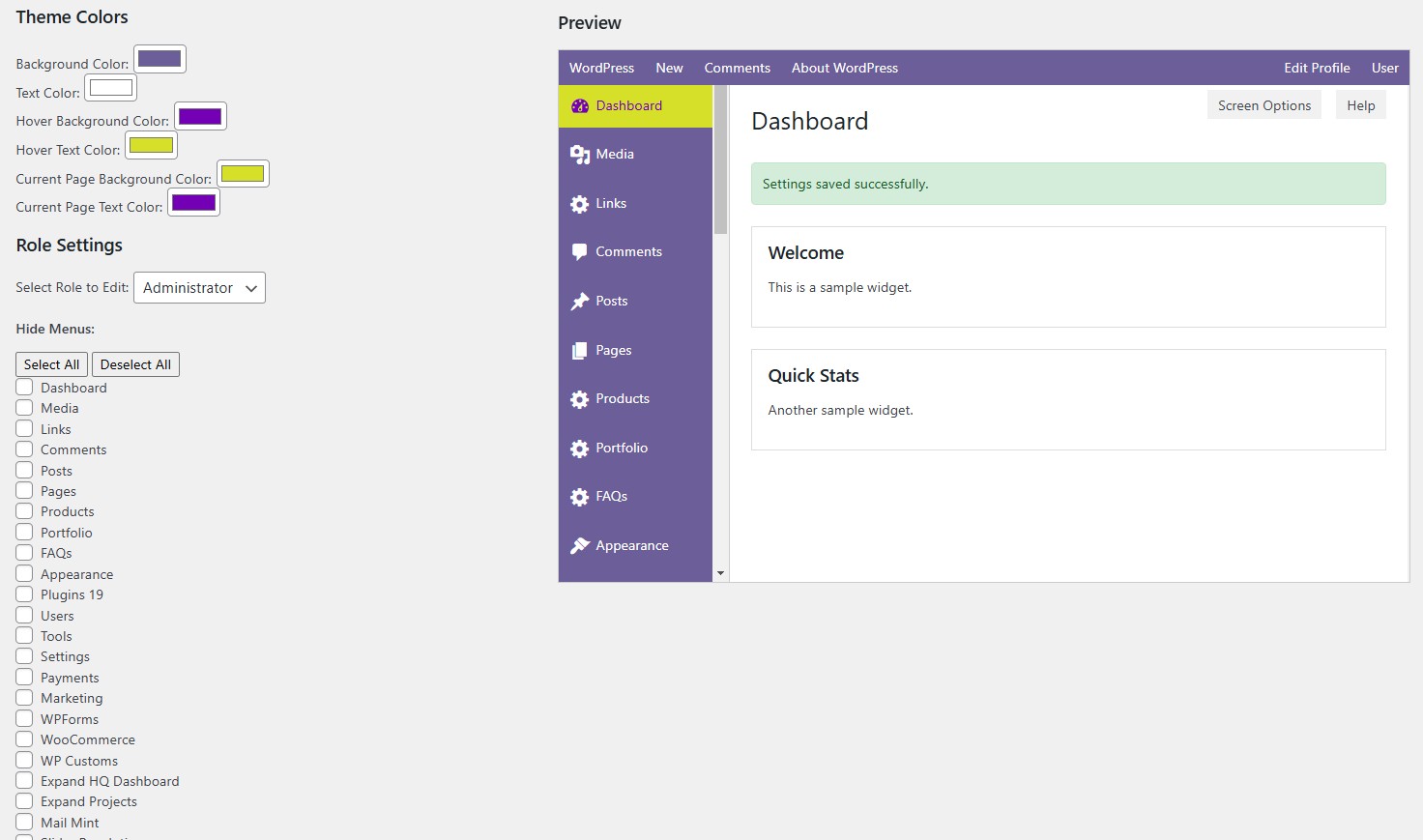
Imagine this: your content editor can update posts without accidentally tweaking plugins. Your developer can access theme files while keeping SEO settings off-limits. Your client can log in to check analytics without seeing a maze of options they don’t understand. With the WordPress Customization Plugin, you can restrict access to specific admin menus based on user roles—or go granular and customize permissions for individual users.
This feature is a lifesaver for agencies and multi-user sites. Set up role-based restrictions in minutes: hide the “Plugins” menu from contributors, limit “Settings” to admins only, or block “Appearance” for everyone but your design team. Need more control? Tailor access for specific users—perfect for freelancers, temporary staff, or VIP clients. It’s like handing out keys to your WordPress kingdom, ensuring everyone gets exactly what they need and nothing more. Plus, with security a top concern in 2025, restricting access reduces the risk of human error or unauthorized meddling—a must-have for any serious site owner.
Color Your Dashboard, Boost Your Workflow
Functionality is king, but who says your admin dashboard has to look like a gray relic from 2010? The WordPress Customization Plugin lets you change the color of your WordPress admin interface with a few clicks. Match it to your brand, brighten it up for your team, or just pick a vibe that makes logging in less of a chore. From sleek midnight blues to bold marketing-friendly reds, the choice is yours.
This isn’t just about aesthetics—studies show color impacts mood and productivity. A customized dashboard can make your team feel more connected to the site they’re managing, while a branded look impresses clients logging in for updates. It’s a small tweak with a big payoff, setting the WordPress Customization Plugin apart from the sea of utilitarian WordPress plugins flooding the market.
Why WordPress Customization Plugin Stands Out in 2025
The WordPress plugin ecosystem is crowded, but the WordPress Customization Plugin isn’t here to blend in. Built by Expand—experts in digital marketing tools and custom software development—this plugin combines practical admin customization with a user-friendly experience. It’s lightweight, SEO-friendly (no bloat to slow your site), and designed for businesses that need flexibility without complexity.
Looking for the “best WordPress plugins for 2025”? The WordPress Customization Plugin belongs on that list. It’s ideal for digital marketing agencies managing client sites, eCommerce owners streamlining team access, or developers crafting bespoke WordPress solutions. Pair it with your favorite SEO plugin or lead generation tool, and watch your workflow transform.
Get Started Today
Ready to take control of your WordPress admin experience? The WordPress Customization Plugin is available now, backed by Expand’s commitment to innovative software and standout support. Download it today and see why it’s the must-have WordPress plugin for admin customization in 2025. Restrict access with precision, splash some color on your dashboard, and make your WordPress site work your way.
Visit expandhq.com to learn more, grab a free trial, or explore how the WordPress Customization Plugin can elevate your digital marketing and development game. Because in 2025, your WordPress admin shouldn’t just function—it should inspire.


Reviews
There are no reviews yet.